A survey is the beginning of a conversation, not the end of the work. HR Delivery brings your survey design, participant experience, aggregate reporting and follow-through into a connected workspace.
Start with the issue you need to understand. Choose one of the eight listening areas below, explore how to implement it and use Survey Studio in the portal to build your own survey or prepare the approved content when it is supplied.
EIGHT WAYS TO LISTEN
The right conversation. The right moment.
Explore what each approach is for, what it can help your organisation understand and how to implement it in the portal.
Understand how employees experience their roles, resources, management and working environment. A satisfaction survey gives people a structured way to describe what works and what gets in their way.
Explore how people connect with the organisation, its direction and the contribution they make. Engagement listening examines the conditions that support commitment, involvement and a willingness to contribute.
Use short, focused surveys between deeper listening exercises. A pulse helps you check a specific issue, monitor an agreed action or understand how a change is being experienced while there is still time to respond.
Offer a simple way for people to share how work feels at a particular moment. A mood check-in can open a conversation about energy, pressure or support without asking employees to complete a lengthy survey.
Explore the working conditions that affect people’s experience of workload, energy, support and recovery. A workplace wellbeing survey helps organisations discuss how work is designed and supported.
Capture a consistent view of why people leave and how they experienced their time with the organisation. A structured exit survey creates a useful basis for a thoughtful exit conversation and aggregate learning.
Understand the new-starter experience from preparation and arrival to early role clarity, support and integration. Onboarding listening helps you identify gaps while a new colleague is still building confidence in the role.
Listen to employees and managers who use HR services. Service-user feedback examines accessibility, responsiveness, communication and the usefulness of the support people receive.
Survey Studio is ready for custom surveys. The eight service starters await their supplied, approved question sets. Sample downloads currently contain a labelled front cover only; full example reports will be added later.
INSIDE THE ENGAGEMENT & WELLBEING DEPARTMENT PORTAL
Meet Survey Studio.
Build thoughtfully. Share simply. Keep the evidence and the follow-up together.
01 / SURVEY STUDIO
Build with clarity
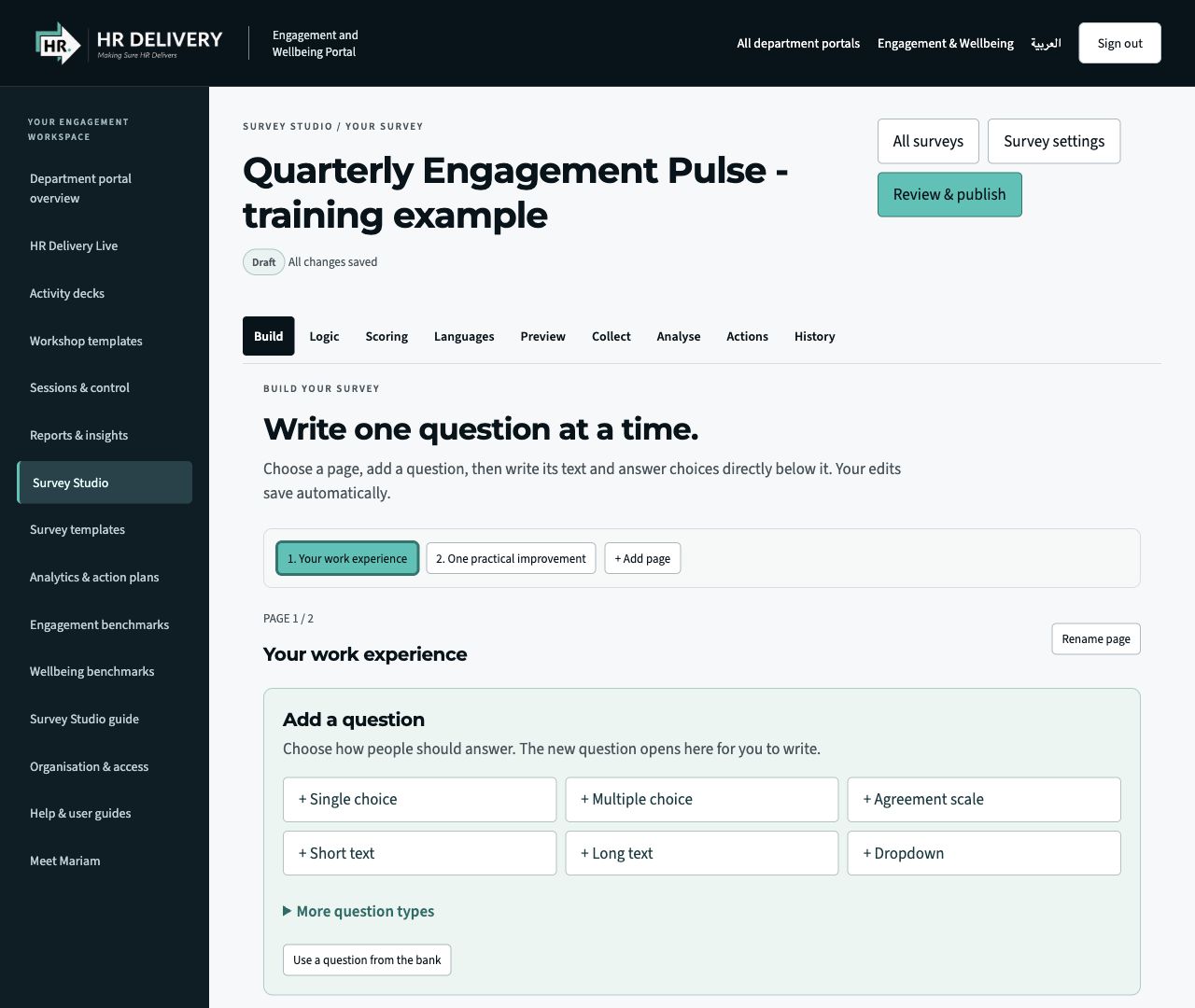
Add pages and questions. Choose formats, edit the wording and preview the participant experience.
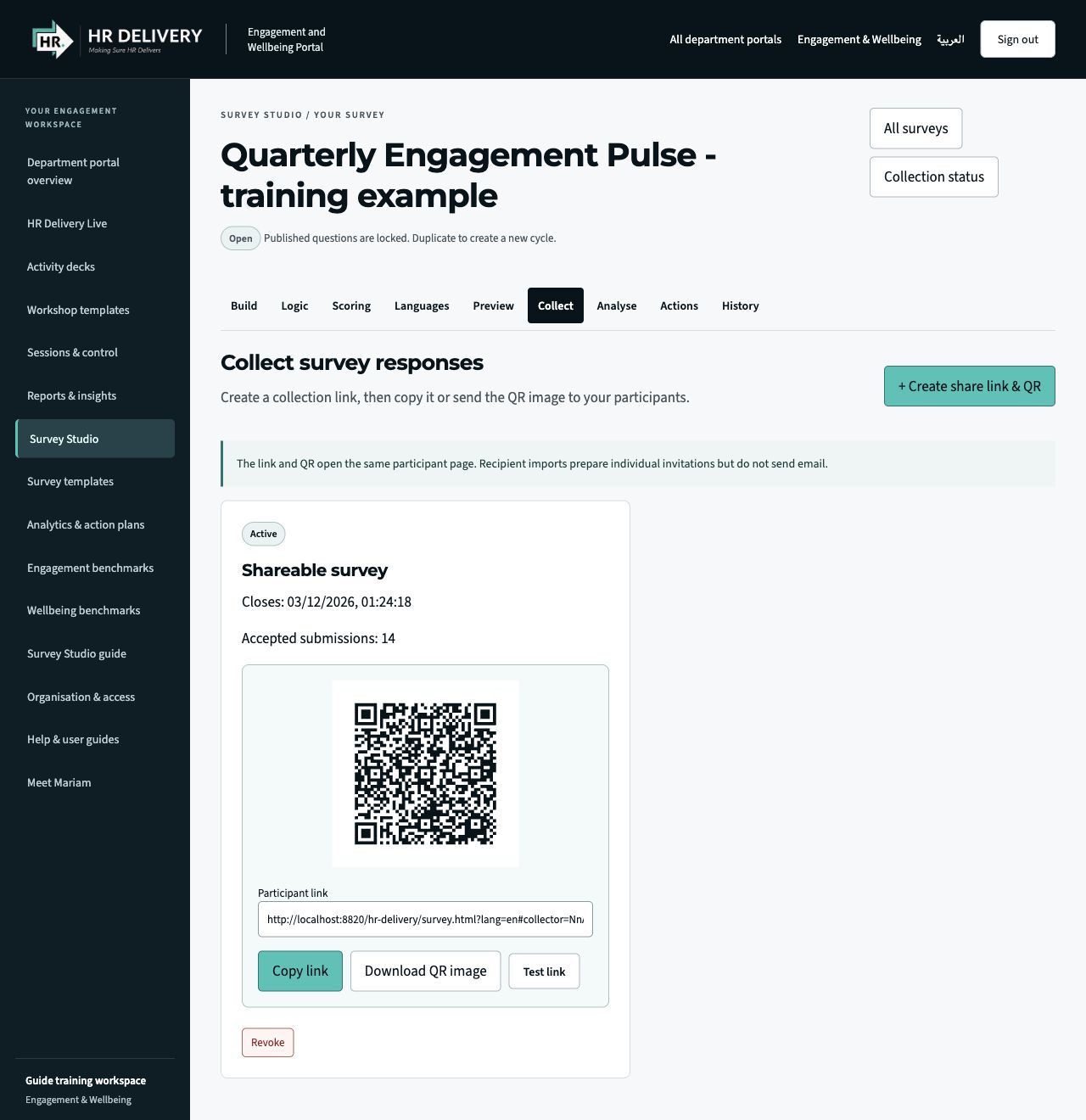
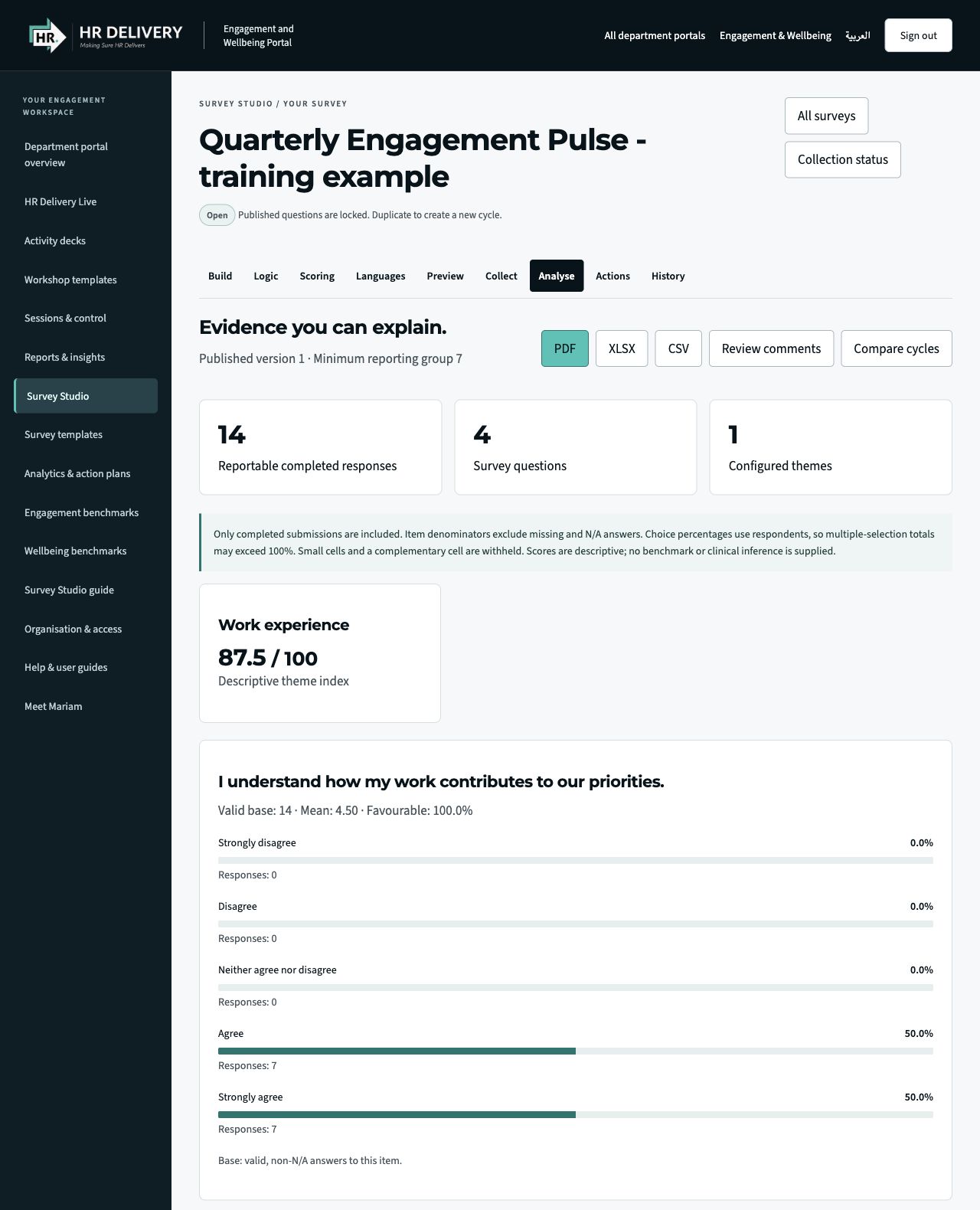
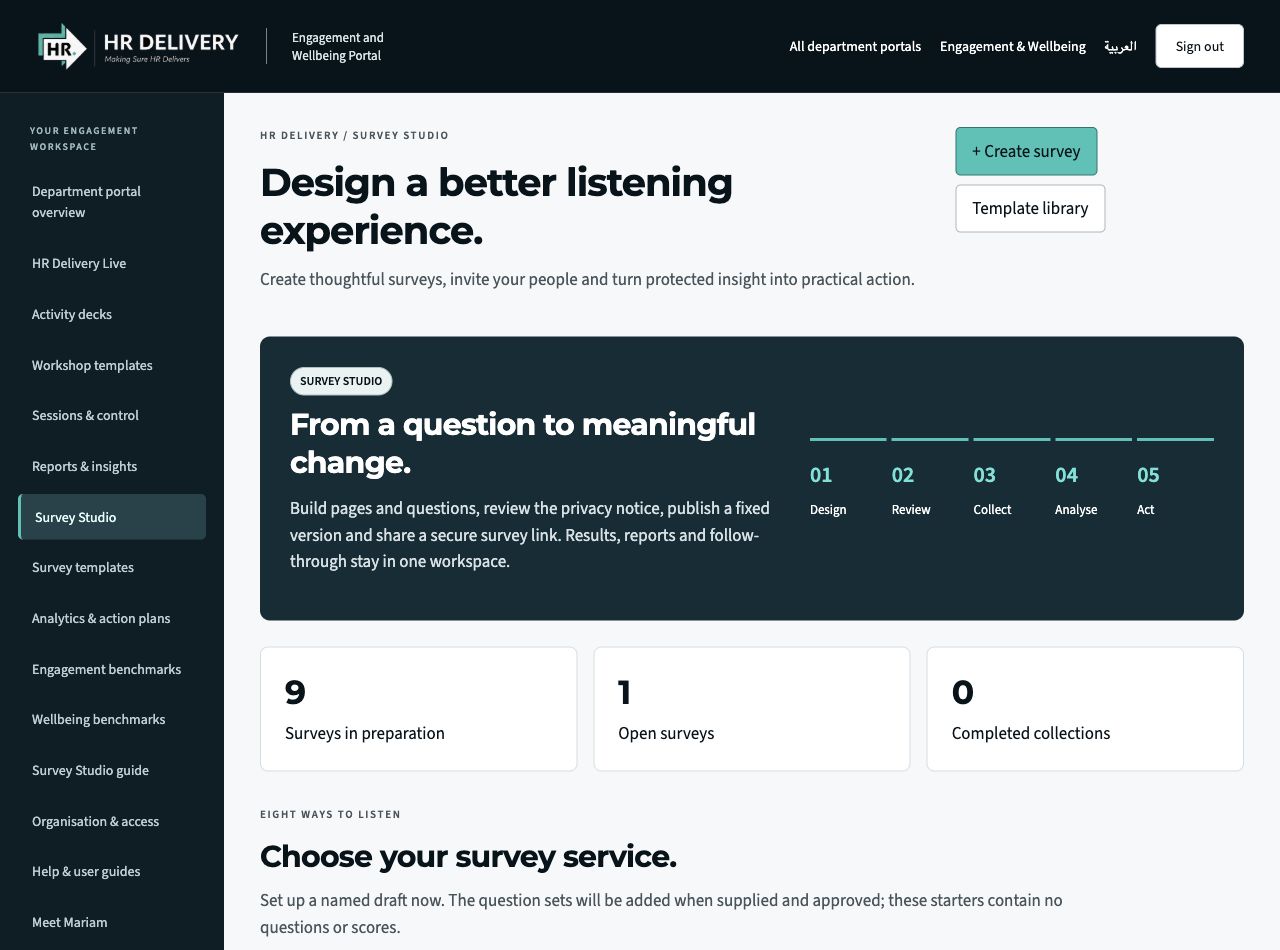
Actual Survey Studio interface in an isolated demonstration workspace. Questions, responses, figures and the pictured QR/link are illustrative, not client data or a live survey invitation. Screens show the English interface.
01
Your survey, your purpose
Start from a blank survey or an editable general template. Add approved content and explain what the responses will inform.
02
More than one question format
Use choice questions, agreement and rating scales, text, ranking and other supported formats. Group questions across pages and preview the flow.
03
Review before you publish
Complete the purpose, privacy and language checks. Published questions stay fixed for that collection; duplicate a cycle to develop the next version.
04
Make participation straightforward
Share a browser link or QR image. Participants can respond without a portal account. Recipient imports prepare invitations; automated email requires a connected sender.
05
Understand what the results mean
Review question-level patterns, configured themes and compatible survey cycles. Minimum group and small-cell rules govern what is shown.
06
Take the findings into action
Export aggregate PDF, Excel or CSV reports when permitted. Assign action owners, dates and progress updates within the workspace.
Agree the purpose, audience and decisions the survey will inform.
02
Build
Create pages, choose question formats and add approved wording.
03
Review
Set privacy, preview the journey and approve the version to publish.
04
Share
Create a participant link and QR code, then collect responses.
05
Act
Review reportable results, agree actions and follow through.
Choose privacy deliberately. Studio supports anonymous, confidential and identified profiles, with minimum reporting groups and small-cell rules. Review the purpose, wording and who will use the findings before you launch. Custom surveys are not automatically validated instruments.
MORE WAYS TO INVOLVE YOUR PEOPLE
Keep the conversation moving.
HR Delivery Live
Bring workshops, meetings and town halls to life with polls, scales, word clouds and facilitated discussion. Live is a separate space from a published employee survey.
Explore the benchmark tools and their reference context. Use them as context for discussion; they do not validate a custom questionnaire or explain a result on their own.
Meet Mariam for help structuring a listening purpose, exploring anonymised themes and planning next steps. Start with Lama, your first point of contact, to arrange specialist support.
↗Choose the right listening approach for the question.
↗Collect responses and examine patterns in an organised workspace.
↗Connect findings with practical improvements and follow-up.
TOOLS, STUDIOS & WORKING RESOURCES
See what you can put to work.
Open the existing portal for its tools and resources. Access within a studio follows the roles and permissions set for that workspace.
01
Survey Studio
Set the purpose, build questions and organise a survey. Create a collection link and QR code for participants to reach the published survey.
02
Eight listening areas
Explore satisfaction, engagement, pulse, mood, wellbeing, exit, onboarding and HR service-user listening. Match the approach to the moment and intended use.
03
Live polling
Invite participation in a live session and discuss responses together. Bring a structured listening moment into workshops and team conversations.
04
Engagement & wellbeing benchmarks
Explore benchmark tools and reference context. Use supported PDF and CSV outputs to take the discussion into planning.
05
Findings & action plans
Review reporting and anonymised themes, then translate priorities into actions, owners and review conversations.
06
Survey links, QR & invitations
Take a published survey to its intended audience through a shareable participant link and downloadable QR image. Choose an open collection or prepare individual invitation links, set its closing date and test the participant journey before sharing. Keep response collection connected to the published question version and review results once the survey’s reporting threshold is met.
Specialist AI support helps with research, structure and first drafts. Contact HR Delivery to arrange the service and agree the support your organisation needs.
Survey Studio supports the listening journey from questions and review to collection, analysis and follow-up. Explore the template library, prepare a survey and share its published participant link or QR code. Live polling and engagement and wellbeing benchmarks provide additional ways to involve people and put findings in context.
Survey Studio: listening workflow and navigation. English interface; isolated demonstration workspace, no client or employee records.Enlarge and explore ↗